GU Newsletter (Subscribe/Unsubscribe)
GU Newsletter (Subscribe/Unsubscribe)
ABOUT E-MAIL NEWSLETTER
Our newsletter will keep you up-to-date with the latest launches, arrivals and exclusive promotions and limited time offers.
Please CLICK HERE to enter your email address and Unsubscribe from Email Newsletter.
Follow the instructions below to manually Unsubscribe from Email Newsletter:
1. Login to your GU account
2. Click "Preference Settings " page under Profile settings
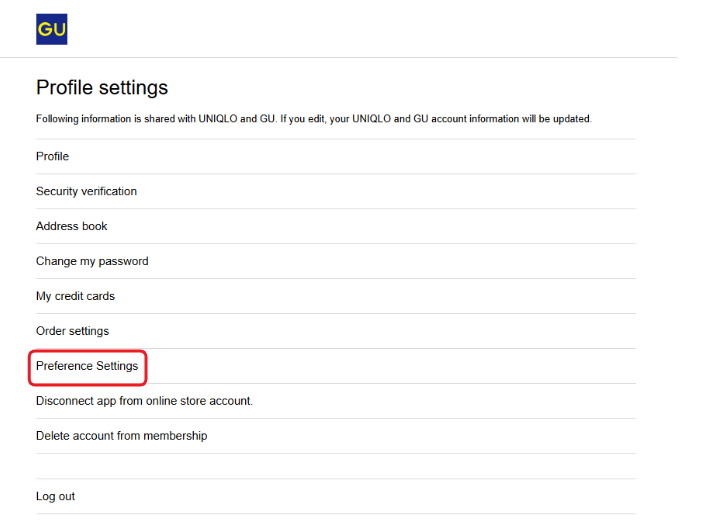
3. Uncheck the "GU enews" box and select [Save]. Make sure the box is not checked as shown in the photo below.
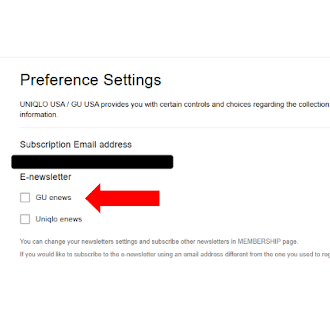
4. Check the changes on the change completion page.
For G-Mail users:
1. Click the Unsubscribe button at the top right corner of the GU Newsletter email in your inbox.
* Please note after unsubscribing, the e-mail newsletter may take up to a week to be discontinued.
For instructions on how to Subscribe to Email Newsletter:
1. Login to your GU account
2. Click "Preference Settings" page under Profile settings
3. Check the "GU enews" box and select [Save].
4. Check the changes on the change completion page. You will know you are subscribed when it states "GU enews" under : E- newsletter.
* After registration, we will send you a registration completion email. The e-mail newsletter will be delivered the next following week..
Should this FAQ not answer your questions, please contact our Customer Service team using the 'Contact GU USA' button below.
 Suggestion Box
Contact GU USA
Suggestion Box
Please let us know your suggestion and impressions.
We will continue to improve GU's products and services based on customer feedback.
Store service survey
Please let us know your thoughts and requests regarding your visit to our store.
We will use this information to improve our store services.